TL;DR
- What they are: AI Overviews are AI-generated summaries powered by Google's Gemini model that appear at the top of search results for select queries.
- How often: They show up for about 12.95% of U.S. searches and are available in 200+ countries and 40+ languages.
- Traffic impact: Users click traditional results 8% of the time when an AI Overview is present, vs 15% when no AI Overview appears (Pew Research).
- How to optimize: Make pages crawlable, target long-tail queries, answer questions directly in the first 100 words, demonstrate real expertise (E-E-A-T), build brand mentions, and format content for clean extraction (lists, tables, FAQs).
- The catch: There's no opt-out and no separate AI Overview ranking system. The same SEO fundamentals that win in regular Search win here.
- June 2026 update: Google now offers dedicated Search Generative AI performance reports in Search Console with impressions data for AI Overviews and AI Mode. Click data is still bundled in the overall organic clicks. Available to a subset of UK site owners first, with global rollout to follow.
Google's AI Overviews now sit above traditional search results for roughly 13% of queries in the U.S., and that share keeps growing. If your content was ranking on page one a year ago but traffic has dropped, AI Overviews are likely part of the reason.
This guide explains what AI Overviews are, how Google builds them, and the specific steps that improve your chances of being cited inside one.
What Are AI Overviews?
AI Overviews are AI-generated summaries that appear at the top of Google Search results for certain queries. Google's Gemini model produces the summary by pulling information from multiple web sources, then displays it with citation links to those sources.
A few core facts:
- Launched: May 14, 2024 in the U.S., expanded globally afterward.
- Available in: 200+ countries and territories, 40+ languages.
- Powered by: A custom Gemini large language model built for Search.
- Frequency: Around 12.95% of U.S. search queries trigger an AI Overview, per Semrush Sensor data.
When you search something like "how to lose weight" or "best CRM for small business," Google generates a direct answer with bulleted steps or product picks, then lists the sources it used on the side.
How AI Overviews Differ from Featured Snippets and AI Mode
Featured snippets pull a passage from one ranking page. AI Overviews synthesize information from several pages into a new answer written by Gemini. AI Mode is a separate, more conversational experience Google launched in 2025 where the entire search interface becomes a chat.
How Do AI Overviews Work?
AI Overviews work by running a process called query fan-out. Instead of treating your search as a single query, Gemini breaks it into multiple related sub-queries, runs them in parallel, then stitches the best information into one answer.
The system evaluates three main signals when picking sources:
- Content quality: How accurate, original, and useful the page is.
- Source authority: How trusted the domain and author are on the topic.
- Relevance: How directly the content answers the specific sub-query.
If your page wins on those signals for any of the sub-queries inside a fan-out, you have a shot at being cited.
Where and When Do AI Overviews Appear?
AI Overviews appear above the standard 10 blue links, though they sometimes sit below ads or featured snippets. Google triggers them selectively based on query complexity and whether the AI summary would actually help the searcher.
The query types that trigger AI Overviews are shifting fast. Semrush research shows the breakdown changed dramatically in one year:
| Query Type | October 2024 | October 2025 |
|---|---|---|
| Informational | 89.03% | 57.16% |
| Navigational, Commercial, Transactional | 10.97% | 42.84% |
In plain terms: AI Overviews started as a feature for "how does X work" questions. They now show up for "best laptop under $1000," "buy noise-canceling headphones," and other commercial queries that used to be safe traditional-SEO territory.
Why AI Overviews Matter for Your Traffic
AI Overviews matter because they reduce the clicks your site receives even when you rank well.
A Pew Research Center study found that users click traditional links only 8% of the time when an AI Overview is present, compared to 15% when no AI Overview appears. Click-through inside the AI Overview itself sits at just 1%.
So the math has changed:
- Ranking #1 with no AI Overview present: ~15% of users click your link.
- Ranking #1 with an AI Overview above you: ~8% click your link, 1% click the AI Overview source.
The takeaway is brutal but simple. Traditional ranking still matters, and being cited inside the AI Overview now matters too. Brands mentioned in AI Overviews gain visibility even when no link goes to their site, because the user reads the brand name in Google's recommended answer.
How to Optimize for AI Overviews
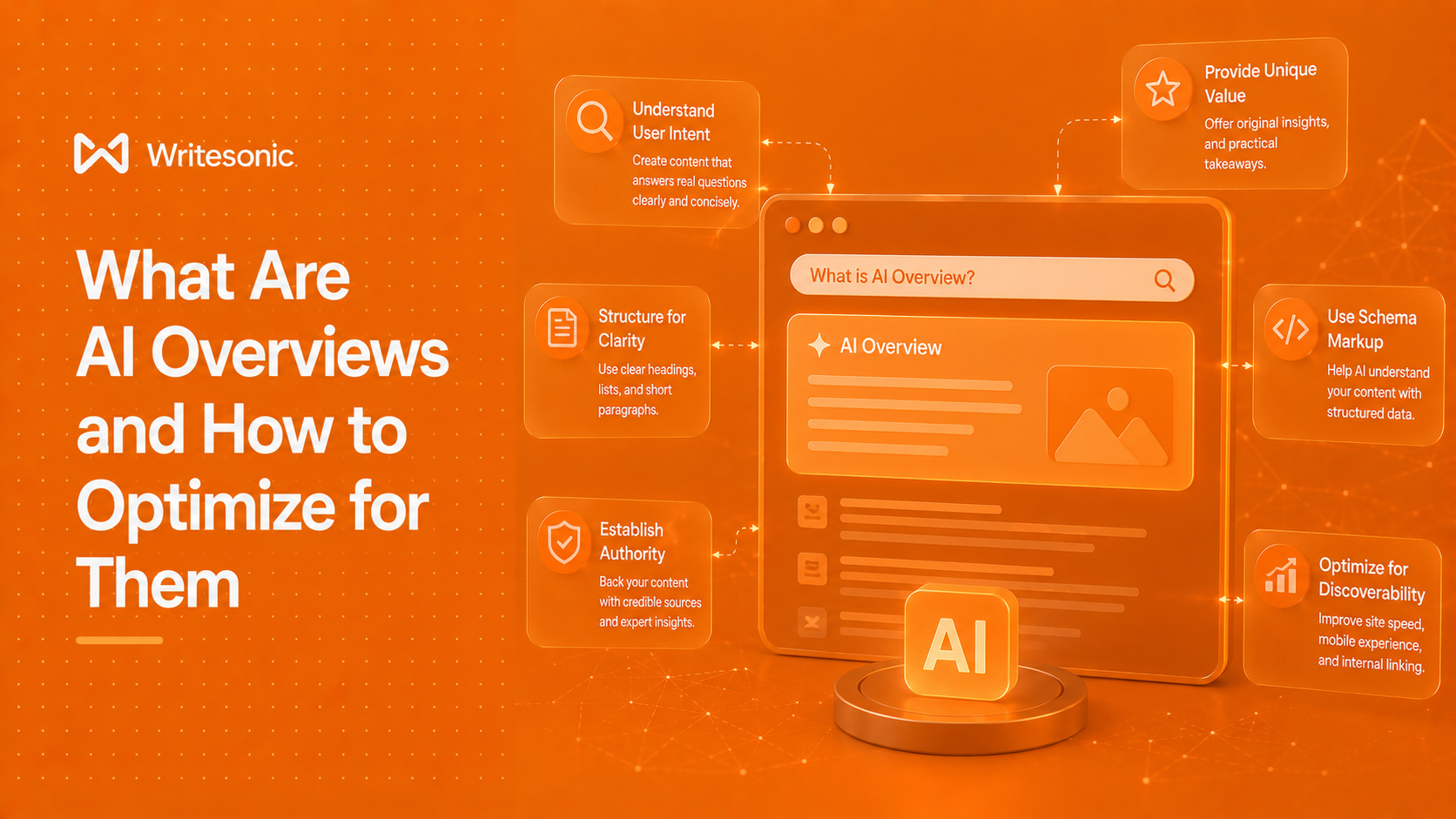
Google's own developer documentation says: apply the same foundational SEO best practices you already use for regular Search. There is no separate "AI Overview ranking factor" to manipulate. The eight tactics below are the ones that move the needle.
1. Make Sure Google Can Crawl and Index Every Important Page
If Google can't crawl your page, your page can't be cited in an AI Overview. Check for:
- Robots.txt rules that accidentally block important sections.
- Noindex tags left over from staging environments.
- 4XX errors (404 Not Found, 403 Forbidden) on pages you want indexed.
- Broken site structure where deep pages have no internal links pointing to them.
Run a crawl with a site audit tool every quarter and fix any indexability issues at the top of the list.
2. Target Long-Tail, Specific Queries
AI Overviews shine on complex multi-part questions. A query like "best running shoes for flat feet under $150 with wide toe box" is more likely to trigger and cite specific sources than a broad query like "running shoes."
Build content around these specific questions:
- Pull long-tail variations using a keyword tool with a 4+ word minimum filter.
- Group related questions into single comprehensive pages instead of one thin page per query.
- Answer the question directly in the first 100 words of the page.
3. Write the Direct Answer First
At Writesonic, we have found that LLMs scan for sentences that answer the query cleanly. A page that buries the answer under three intro paragraphs loses to a page that opens with the definition.
Structure each section like this:
- Sentence 1: Direct answer to the heading question.
- Sentence 2-4: Supporting context, numbers, or proof.
- Rest: Examples, nuance, edge cases.
If your H2 is "What is conversion rate optimization?", the first sentence under it should be "Conversion rate optimization is..."
4. Demonstrate Real Expertise (E-E-A-T)
Google's quality systems prioritize content with experience, expertise, authoritativeness, and trustworthiness. AI Overviews lean on the same signals.
What helps:
- Original data, surveys, or research only you can publish.
- Named authors with credentials and bios linking to their work elsewhere.
- Citations to primary sources (academic papers, government data, original studies).
- Updated publish dates with substantive changes, not just date stamps.
What hurts: AI-generated filler with no original insight, anonymous author bylines, and pages that paraphrase other articles without adding anything.
5. Use Clean On-Page SEO Fundamentals
Standard on-page elements still teach Google what your page is about:
- Title tags with the primary keyword near the front.
- Meta descriptions that read like a useful preview, not a keyword soup.
- URL slugs that are short and descriptive.
- Heading hierarchy (one H1, logical H2s and H3s) that mirrors the structure of the topic.
- Schema markup for FAQ, How-To, Article, and Product where applicable.
6. Build Brand Mentions, Not Just Backlinks
For traditional SEO, backlinks have always been the dominant off-page signal. For AI Overviews, unlinked brand mentions appear to matter more than they used to. Gemini reads the wider web and notices which brands get talked about in the context of which topics.
Ways to earn mentions:
- Publish original research that journalists cite.
- Respond to journalist requests on platforms like HARO, Qwoted, and Featured.
- Get featured in industry roundups and "best of" lists.
- Partner with complementary brands on joint content.
7. Optimize for User Experience
Slow, broken, or hard-to-read pages get filtered out before the citation decision happens. The minimums in 2026:
- Largest Contentful Paint under 2.5 seconds.
- Fully responsive on mobile with no horizontal scrolling.
- HTTPS site-wide.
- No intrusive interstitials or layout shift on load.
8. Format Content for Easy Extraction
LLMs prefer content they can lift cleanly. Help them:
- Break complex topics into bulleted or numbered lists.
- Use comparison tables for "X vs Y" queries.
- Add a clear FAQ section using question-based H3s.
- Keep paragraphs to 3-4 sentences max.
- Bold the key term when you define it.
How to Check If Your Site Appears in AI Overviews
You can track AI Overview appearances using SEO tools that monitor SERP features. In Semrush's Organic Rankings tool, filter the Positions tab by SERP Features, then select "AI Overview" under Domain Ranks. Ahrefs, SE Ranking, and other major platforms offer similar filters.
June 2026 update: Google has begun rolling out dedicated Search Generative AI performance reports inside Google Search Console. The new reports separate impressions from AI Overviews and AI Mode from standard search results, broken down by page, country, device, and date (with hourly through monthly granularity). The reports also cover generative AI features in Discover.
The new reports, however, only show impressions, not clicks. Click data still gets bundled with the standard performance report.
For tracking that goes beyond Google, there are some AI visibility tools, that can monitor your brand's presence across AI Overviews, ChatGPT, Perplexity, Gemini, and other major LLMs from a single dashboard. This matters because users now run the same query across multiple AI tools, and tracking only Google's AI Overview misses a growing share of how people discover brands today.
What you can't do: see AI Overview click data separately in Google Search Console. Google bundles all clicks (organic, SERP features, AI Overviews, AI Mode) into the same performance report and has not announced plans to split them out.
Can You Opt Out of AI Overviews?
There is no direct opt-out for AI Overviews. Three indirect methods exist, all with significant tradeoffs:
- Robots.txt block: Stops Google from crawling the page, which also removes it from regular search.
- Noindex meta tag: Removes the page from the index, which removes it from all search results.
- Nosnippet meta tag: Prevents Google from generating any snippet, which also kills your featured snippet potential.
Each option reduces your AI Overview exposure by killing your search visibility entirely. For most sites this is the wrong trade.
The Bottom Line
AI Overviews are the new front page of Google Search for an expanding share of queries. The brands that win in 2026 are not the ones trying to game a new algorithm. They are the ones publishing content with real expertise, structured for clean extraction, supported by genuine brand authority across the web.
Your best move is to audit your top 20 pages today: which ones already rank for queries that trigger AI Overviews, and which of those are getting cited? Start optimizing the ones that rank but aren't cited yet. That's where the closest wins live.
Writesonic's AI Visibility Tracker maps that gap for you automatically. It tracks which of your pages appear in AI Overviews and flags the ones that rank but aren't cited, so you know where to focus without manually checking query by query.
Frequently Asked Questions (FAQs)
The #1 brand in ChatGPT changes 52% of the time.
Get the report and find out why.

GEO Strategist at Writesonic
Rohit is an GEO Strategist at Writesonic with nearly a decade of experience driving organic growth across industries. Over the past 9 years, he has partnered with brands across BFSI, ecommerce, and B2B SaaS, helping them turn search visibility into measurable revenue. His expertise lies in Generative Engine Optimization (GEO) and AI Search, where he crafts strategies that help brands earn placement in answers from ChatGPT, Perplexity, Google AI Overviews, and beyond.